
Monitoring device status
Simple Network Management Protocol (SNMP) provides a standardized method for monitoring the status and health of network-connected devices. On Masterclock devices, SNMP is used to report operational and reference status information. This article covers monitoring and querying status; configuration capabilities depend on the device and its MIB.
SNMP roles and terminology
SNMP uses two primary components:
- SNMP Agent: the software running on the Masterclock device that exposes status information.
- SNMP Manager: external software (also called a MIB Browser) used to query the Agent and display returned data. SNMP Manager software is not provided by Masterclock.
Supported SNMP versions and defaults
SNMP-capable Masterclock devices support SNMP v1, v2, and v3. SNMP v1 and v2 are disabled by default and can be enabled manually when required by the SNMP Manager.
For v1/v2, enable the required version and use matching community settings on the device and manager. For v3, use the configured user, security, and context settings. See Configuring SNMP on Masterclock Devices for agent, query and trap-receiver setup.
Legacy device limitations
Some older hardware and firmware generations do not provide SNMP. An absent SNMP feature is not necessarily a disabled agent. Confirm the model and installed firmware before using these instructions; see legacy firmware compatibility.
How SNMP is enabled on Masterclock devices
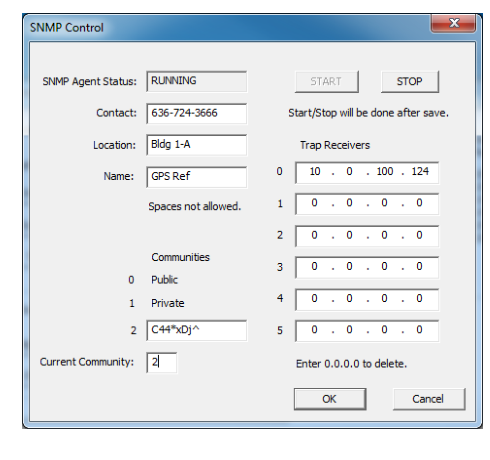
SNMP operation is enabled and controlled through WinDiscovery using the SNMP Control window. From this interface, you can start or stop the SNMP Agent and set identifying fields such as device name, location, and contact.
Community strings and access control
For community-based SNMP v1/v2 queries, community strings act as an access control mechanism. Only requests that match the active community string are accepted by the device.
Masterclock devices support default communities and a configurable custom community that can be selected as the active community.
Automatic notifications and queried status
Traps are event notifications: the device generates and sends a message to its configured trap receivers when the corresponding event occurs. The manager does not need to query the device to receive each notification.
Queries retrieve status: other information may require an SNMP GET or walk against readable objects in the device’s MIB. Queries can be run manually or scheduled by monitoring software. A readable status object does not necessarily have a corresponding automatic trap.
Configure trap receivers to receive notifications and use queries to inspect available current status. The supported notifications and readable objects depend on the model and firmware.
GMR6000 automatic trap notifications
The GMR6000 generates and transmits messages for the following 16 notification definitions. Event notifications are sent automatically when triggered; receiving them does not require polling. The test notification provides a way to check notification delivery. This list applies specifically to the GMR6000. Use its MIB and received variable bindings to interpret each message.
| Event or status | Definition names |
|---|---|
| Test notification | GENERIC_TRAP_TEST |
| Warm and cold start notifications | GENERIC_TRAP_WARM_STARTGENERIC_TRAP_COLD_START |
| Network link up and down | GENERIC_TRAP_LINK_UPGENERIC_TRAP_LINK_DOWN |
| DHCP and network configuration events | GENERIC_TRAP_DHCPGENERIC_TRAP_NETWORK_CONFIG |
| GNSS jamming status: okay or interference indicated | GENERIC_TRAP_GNSS_JAMMING_OKAYGENERIC_TRAP_GNSS_JAMMING_INDICATED |
| GNSS spoofing status: indicated or affirmed | GENERIC_TRAP_GNSS_SPOOFING_INDICATEDGENERIC_TRAP_GNSS_SPOOFING_AFFIRMED |
| GNSS continuous-wave interference indicated | GENERIC_TRAP_GNSS_CONTINUOUS_WAVE_INDICATED |
| Oscillator holdover status | GENERIC_TRAP_HSO_HOLDOVER |
| Rubidium oscillator status | GENERIC_TRAP_HSO_RUBIDIUM |
| Time-reference status or change | GENERIC_TRAP_REFERENCE |
| Spoofing status labeled none | SPOOFING_STATUS_NONE |
The names above identify notifications; they do not specify numeric OIDs, severity levels, thresholds or transmission intervals. In particular, do not infer a precise transition or a recovery sequence from a name alone.
The definitions GENERIC_TRAP_GNSS_SPOOFING_OKAY, GENERIC_TRAP_GNSS_CONTINUOUS_WAVE_OKAY and GENERIC_TRAP_POWER_STATUS exist in software but have not been verified as transmitted. Do not depend on them as alarm-clearing or power-monitoring notifications. For status that is not automatically reported, query the relevant readable MIB object where available. These definition names are not themselves a list of queryable objects. A missing trap alone does not confirm that an alarm condition has cleared.
Masterclock custom MIB
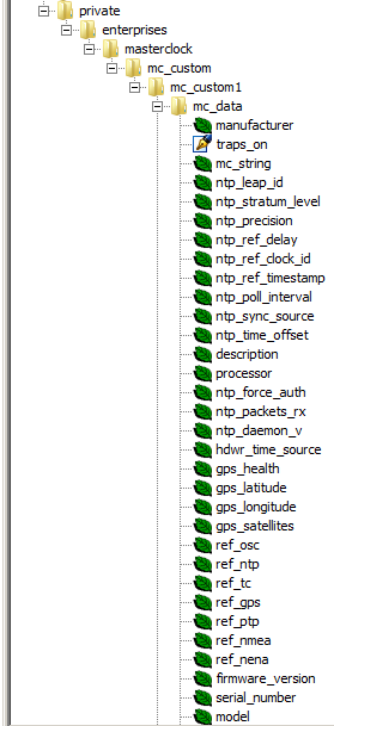
In addition to standard SNMP objects, Masterclock provides a custom Management Information Base (MIB) that exposes device-specific data, such as reference and synchronization status and system health indicators.
Related articles
Article ID: KB-SNMP-001
KB Version: