
Symptoms
- PTP client devices display time approximately 37 seconds different from UTC, NTP, GPS/GNSS, or other time displays.
- The GMR appears synchronized, but one or more PTP clients show a consistent offset.
- The offset remains close to 37 seconds instead of drifting gradually over time.
Causes
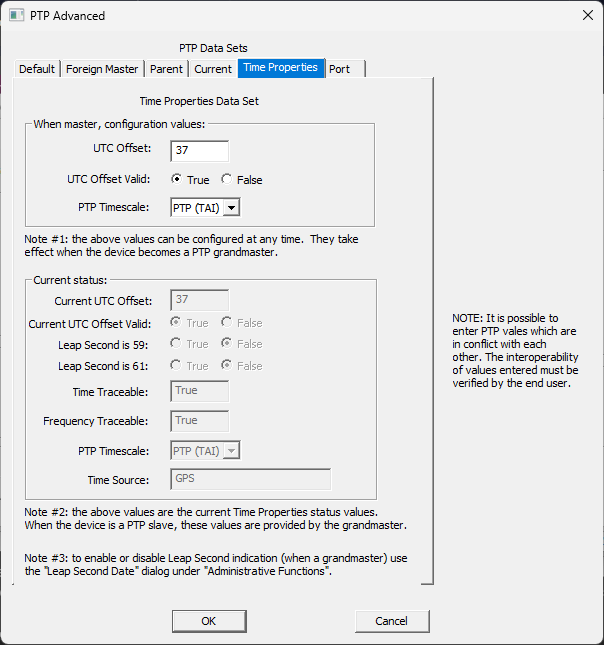
- PTP can use a TAI-based timescale instead of UTC. TAI does not apply leap seconds the same way UTC does.
- Some downstream devices expect UTC-based time and may display a 37 second offset when receiving PTP time using the PTP (TAI) timescale.
- The PTP timescale setting on the GMR does not match the timescale expected by the downstream PTP client.
Troubleshooting steps
- Confirm the offset is approximately 37 seconds.
A consistent 37 second difference usually points to a PTP timescale interpretation issue, not clock drift. - Open the PTP Time Properties settings in WinDiscovery.
Open Device Settings, select Precision Time Protocol, then select Advanced and open the Time Properties tab. - Review the PTP Timescale setting.
The GMR can be configured for PTP (TAI) or UTC (ARB), depending on what downstream devices expect. - Select the timescale required by the downstream devices.
Use PTP (TAI) for devices that expect PTP time based on TAI. Use UTC (ARB) for devices that require UTC-based PTP time. - Verify the client display after the setting is applied.
Confirm that the PTP client reports the expected time after the GMR resumes PTP grandmaster operation.
Related articles
Article ID: GMR-PTP-001
KB Version: